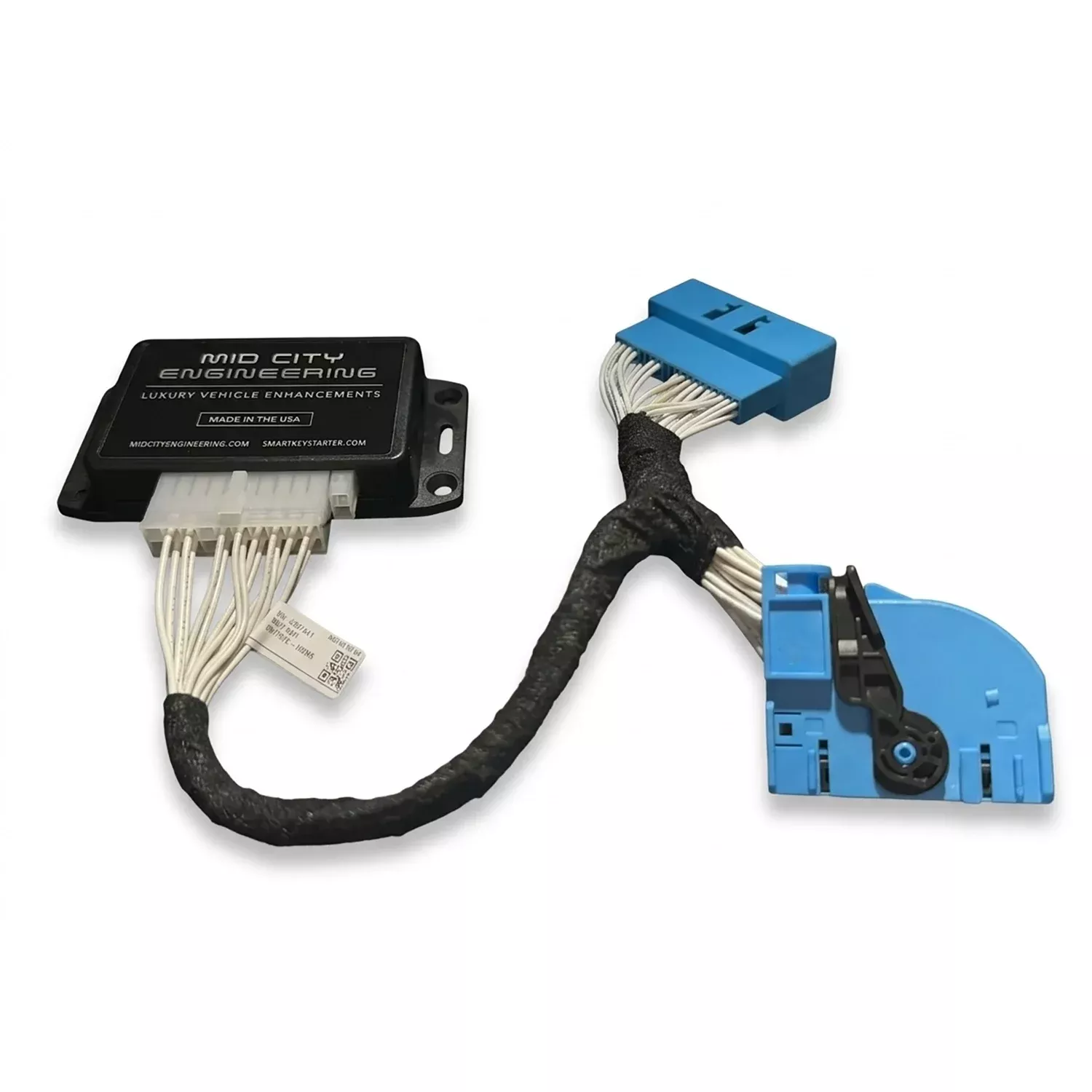
The Mid City 360° Camera On-Demand Module for 2025+ Mercedes Sprinter Vans (907G360) from Nomadic Supply Company® is a specialized solution for owners of the 2025-2026 Mercedes-Benz Sprinter. This plug-and-play device overrides the restrictive factory settings that automatically disable your camera feed once the vehicle exceeds 10 MPH, allowing for continuous monitoring of your surroundings or towed cargo at highway speeds.
Designed specifically for the latest Sprinter models equipped with the MBUX infotainment system, this programmer provides the ultimate safety upgrade for RVers and fleet operators. By removing the 10 MPH speed cutoff, you gain the ability to toggle your OEM 360-degree or rear camera at any time using the factory camera button. This is essential for checking on a trailer, verifying blind spots during lane changes, or navigating tight spaces where visibility is limited. The installation is entirely non-invasive, utilizing a simple OBD-II port interface that programs the vehicle in seconds.
Mid City 360° Camera On-Demand Module for 2025+ Mercedes Sprinter Vans (907G360) Features:
- Speed Limit Removal: Overrides the factory 10 MPH auto-cutoff, allowing you to view your camera feed at any speed.
- Two Programming Modes:
- Default Mode: The camera still turns off at 10 MPH but can be immediately reactivated with the camera button for high-speed viewing.
- “Always-On” Mode: The camera remains active regardless of speed and must be manually turned off using the camera button.
- Plug & Play Installation: Simply plug the module into the OBD-II port, follow the brief programming sequence (using the turn signal stalk for mode selection), and remove the device once finished.
- VIN-Locked Security: The programmer is locked to your vehicle’s VIN, allowing you to easily reprogram the settings or return to factory specs if needed.
- Seamless Integration: Works directly with your factory MBUX screen and camera button for a clean, stock appearance.
- Expanded Compatibility: Specifically engineered for 2025-2026 models with 360-degree cameras or rear cameras with parking sensors.
Mid City 360° Camera On-Demand Module for 2025+ Mercedes Sprinter Vans (907G360) Specifications:
- Compatibility: 2025+ Mercedes-Benz Sprinter (W907/VS30).
- System Requirement: Must be equipped with MBUX and the Factory Parking Package (360° or Rear Camera + Sensors).
- Interface: OBD-II (On-Board Diagnostics).
- Programming Time: Typically takes 10 seconds to 5 minutes.
- Controls: Turn signal stalk (for selection) and factory Camera/MBUX buttons (for operation).
- Reversibility: Includes a third programming option to return all camera settings to OEM factory specifications.
Mid City 360° Camera On-Demand Module for 2025+ Mercedes Sprinter Vans (907G360) Installation Guide:
Here are the easy-to-follow instructions for the Mid City Engineering 907G360 module. This interface allows you to activate the vehicle’s factory 360-degree cameras on-demand while driving, providing better visibility for maneuvering and safety.
Phase 1: Safety & Battery Disconnect
- Locate Quick Disconnect: Find the battery quick disconnect cable located behind an access panel in the driver-side footwell.
- Disconnect Power:
- Identify the cable with the red tab on top.
- Push the red tab downward and pull the cable toward the rear of the vehicle to release it from the post.
- Note: This is a critical safety step to prevent electrical shorts during the T-harness installation.
Phase 2: Interior Disassembly
- Trim & Weather Seal:
- Pull back the weather seal from the driver-side door jamb.
- Use a plastic pry tool to remove the intermediate panel located between the A-pillar and the kick panel.
- Remove Kick Panel:
- Remove the two T20 screws from the sill cover and the single T20 screw located below the hood release lever.
- Remove the T20 screw at the bottom of the kick panel.
- Pull the three plastic push fasteners from the kick panel.
- Carefully pull the kick panel away, unclip the OBD-II harness, and route the hood release lever through the panel opening.
Phase 3: T-Harness Integration
- Locate the EIS: The Electronic Ignition Switch (EIS) module is mounted to the exterior wall inside the driver-side kick area, below the A-pillar.
- Connect Wiring:
- Unlatch and unplug the 40-pin BLUE connector from the top of the EIS module.
- Connect the factory blue plug into the female end of the 907G360 T-harness.
- Connect the blue plug from the T-harness into the EIS module. Ensure the latches click into place.
- Note: If you have a SmartKey Starter already installed, the 907G360 harness should be placed between the SmartKey harness and the OEM vehicle harness.
Phase 4: Finalizing & Reassembly
- Restore Power:
- Reconnect the battery disconnect cable to the post. Push it down until the red tab locks firmly.
- Verify that the cable cannot be pulled off without pressing the red tab.
- Mount the Module: Use zip ties to secure the 907G360 module to a wiring harness under the dash.Caution: Do not mount near heat vents or moving parts like the steering column.
- Reassemble: Reconnect the OBD-II harness and reinstall the kick panel, sill cover, and weather stripping in the reverse order of disassembly.
Phase 5: Operation
- Testing: Turn the ignition on. Follow the specific button-press sequence (typically found in your user manual) on the steering wheel or factory dash buttons to activate the 360-camera view on the MBUX screen while in Drive or Neutral.