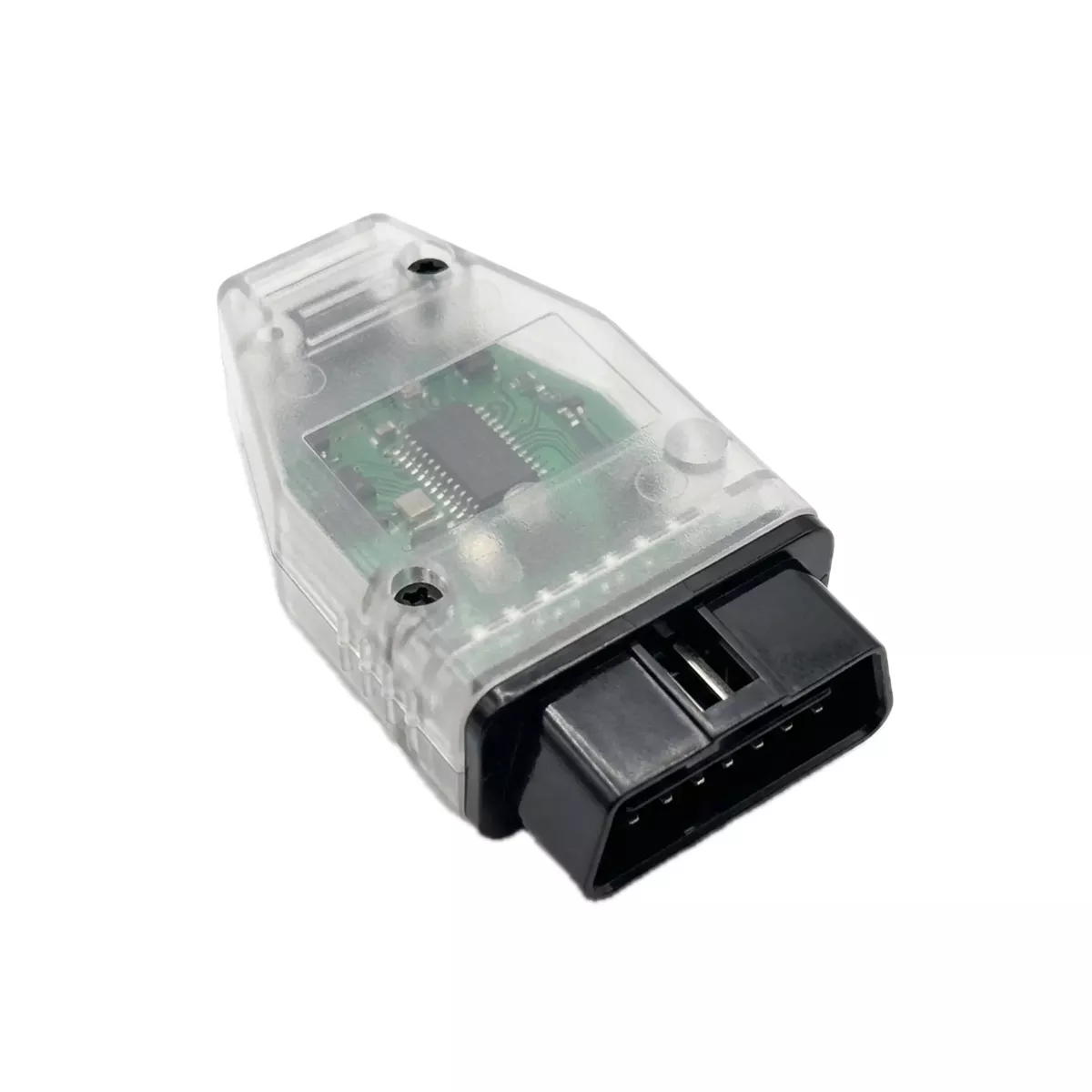
The Mid City SmartIdle OBD Programmer W907 for 2019+ Mercedes Sprinter Vans (907OBDSMRT) from Nomadic Supply Company® delivers professional-grade idle management programming through your vehicle’s diagnostic port. Transform your Mercedes-Benz with this advanced OBD programming solution designed for seamless integration and reliable performance.
Professional drivers and fleet operators rely on the Mid City SmartIdle OBD Programmer W907 for 2019+ Mercedes Sprinter Vans (907OBDSMRT) to optimize their vehicle’s idle settings with precision. The system utilizes your existing turn signal stalk for intuitive programming control, eliminating the need for complex external interfaces or specialized training.
Installation requires no technical expertise, as the Mid City SmartIdle OBD Programmer W907 for 2019+ Mercedes Sprinter Vans (907OBDSMRT) connects directly to your diagnostic port for immediate functionality. The integrated status indicator provides clear visual confirmation when programming is complete, ensuring successful configuration every time.
Mid City SmartIdle OBD Programmer W907 for 2019+ Mercedes Sprinter Vans (907OBDSMRT) Features:
- High-Idle Activation: Specifically engineered to unlock the high-idle software option, allowing the engine to maintain a higher RPM for accessory power or climate control.
- Seamless Integration: Works in conjunction with PSM (Parametrizable Special Module) or PSM JR products to provide a complete engine management solution.
- Intuitive Controls: Utilizes the vehicle’s existing turn signal stalk for programming adjustments, removing the need for external laptops or specialized diagnostic equipment.
- Rapid Deployment: Features a streamlined programming cycle that is completed in as little as five minutes.
- Visual Status Feedback: Equipped with an integrated status indicator light that provides clear visual confirmation once the programming cycle is successfully finished.
- Professional Reliability: Trusted by fleet operators and professional drivers for its precision and consistent performance across the W907 platform.
Mid City SmartIdle OBD Programmer W907 for 2019+ Mercedes Sprinter Vans (907OBDSMRT) Specifications:
- Vehicle Compatibility:
- 2019+ Mercedes-Benz Sprinter W907 / VS30
- 2019+ Freightliner Sprinter W907
- Interface Port: Standard OBD-II (On-Board Diagnostics).
- Hardware Requirements: Designed for use with vehicles equipped with PSM or PSM JR modules.
- Installation Type: 100% Plug & Play software activation; no technical expertise or wiring modifications required.
- Warranty: Industry-leading 4-year manufacturer warranty.
- Operation Logic: Direct ECU parameter modification via the vehicle’s diagnostic framework.
Mid City SmartIdle OBD Programmer W907 for 2019+ Mercedes Sprinter Vans (907OBDSMRT) Installation Instructions:
Here are the easy-to-follow instructions for the Mid City Engineering 907OBDSMRT programmer. This tool activates the high-idle software in Diesel Sprinters and is required for use with SmartIdle® stand-alone systems (907SMRTV4, 907SMRTPSM).
Phase 1: Vehicle Preparation
- Ignition Setup:
- Without pressing the brake pedal, press the Push to Start button twice (Ignition On).
- Verify the instrument cluster is illuminated and warning lights are visible.
- Optional – Reverting to Factory:
- If you wish to use this programmer to remove the feature and return to OEM specifications, push the turn signal stalk UP (right turn signal position) and hold it there during the entire programming procedure.
- For standard activation, leave the stalk in the neutral position.
Phase 2: Programming Sequence
- Cycle and Connect:
- Press the Push to Start button once to turn the ignition OFF.
- Immediately plug the 907OBDSMRT module into the OBDII port under the driver-side dashboard.
- Flash the Module:
- Quickly press the Push to Start button twice again to turn the ignition back ON.
- Note: You must complete the “Ignition Off -> Plug In -> Ignition On” sequence in under 10 seconds for the programming to trigger correctly.
Phase 3: Completion & Verification
- Monitor the LED:
- The LED on the programmer will illuminate during the process. Once the LED turns OFF, programming is complete.
- This usually takes only a few seconds but can take up to 5 minutes. If you do not see the LED turn on, it may have finished within the first few seconds of connection.
- Finalize:
- Turn the ignition OFF.
- Remove the OBD programmer from the port.
Important Safety Warnings
- Removal Required: The OBD programmer must be removed after use. DO NOT start the engine or drive the vehicle while the module is plugged in.
- Prerequisite: High idle will not function unless a SmartIdle® control module is also installed in the vehicle.
- Single Vehicle Use: This tool is VIN-locked to the first vehicle it is used on. It can be reused on the same vehicle to toggle the feature if needed.
- Press the Push to Start button once to turn the ignition OFF.
- Immediately plug the 907OBDSMRT module into the OBDII port under the driver-side dashboard.
- Quickly press the Push to Start button twice again to turn the ignition back ON.
- Note: You must complete the “Ignition Off -> Plug In -> Ignition On” sequence in under 10 seconds for the programming to trigger correctly.
- Monitor the LED:
- The LED on the programmer will illuminate during the process. Once the LED turns OFF, programming is complete.
- This usually takes only a few seconds but can take up to 5 minutes. If you do not see the LED turn on, it may have finished within the first few seconds of connection.
- Finalize:
- Turn the ignition OFF.
- Remove the OBD programmer from the port.