
The Mid City SmartKey Starter Remote Start & Alarm for 2007-2018 Mercedes Sprinter Vans (SKSNG906) from Nomadic Supply Company® delivers professional-grade remote start and alarm capabilities specifically engineered for Mercedes-Benz Sprinter vehicles. This advanced system integrates seamlessly with your existing factory key fob while maintaining complete warranty protection through its non-invasive installation design.
Built with premium automotive-rated components, the Mid City SmartKey Starter Remote Start & Alarm for 2007-2018 Mercedes Sprinter Vans (SKSNG906) offers intelligent climate control features that automatically activate heated or cooled seats and defrost functions based on ambient temperature. The system’s versatile connectivity options support smartphone integration through Drone and Smart Start applications, as well as compatibility with extended-range FM remote controls from Directed or Compustar brands.
Installation professionals and vehicle owners appreciate the steering wheel configuration capability, which allows for easy adjustment of settings and options directly from the steering wheel or turn signal controls. The Mid City SmartKey Starter Remote Start & Alarm for 2007-2018 Mercedes Sprinter Vans (SKSNG906) combines convenience, reliability, and warranty protection in a complete plug-and-play solution designed specifically for Mercedes-Benz applications.
Mid City SmartKey Starter Remote Start & Alarm for 2007-2018 Mercedes Sprinter Vans (SKSNG906) Features:
- Plug-and-Play Install: Simple, seamless installation designed specifically for Mercedes-Benz.
- Factory Key Control: Works with your existing key fob immediately: no extra remote needed.
- Smartphone Ready: Compatible with Drone and Smart Start for control from your phone. Available for purchase.
- Extended Range Remote Compatible: Compatible with Directed or Compustar FM Remote controls. Available at purchase.
- Auto Comfort Control: Automatically activates heated/cooled seats and defrost based on temperature.
- Warranty Safe: Non-invasive installation keeps your factory warranty fully intact.
- Steering Wheel Configuration: Easily adjust settings and options right from your steering wheel or turn signal.
- Premium Hardware: Industry-leading, automotive rated components for maximum reliability.
- 4-Year Warranty: Backed by our comprehensive warranty for total peace of mind.
Mid City SmartKey Starter Remote Start & Alarm for 2007-2018 Mercedes Sprinter Vans (SKSNG906) Specifications:
- Vehicle Compatibility: Mercedes-Benz Sprinter, Dodge Sprinter, and Freightliner Sprinter (W906 Chassis).
- Model Years: 2007-2018 Mercedes Sprinter (W906), 2007-2018 Freightliner Sprinter, 2007-2009 Dodge Sprinter
- Installation Type: 100% Plug-and-Play; seamless integration that does not disrupt vehicle warranties.
- Security Suite (DAS II): Includes a full digital security sensor monitoring for:
- Shock/Impact
- Vehicle Tilt (Towing)
- Glass Breakage
- Security Hardware: Includes an external siren and LED status indicator out of the box.
- Activation Methods: * Factory Key Fob: Supports “Lock-Unlock-Lock” trigger (Note: OEM range is limited).
- Smartphone Integration: Compatible with Compustar Drone and Directed Smart Start.
- RF Remotes: Compatible with Compustar RF remotes for extended range.
- Climate Automation: Automatically activates heated seats and rear-window defroster based on ambient outside temperature.
- User Interface: Features on-board programmability via the vehicle’s turn signal stalk.
Mid City SmartKey Starter Remote Start & Alarm for 2007-2018 Mercedes Sprinter Vans (SKSNG906) Includes:
- Automotive control module
- Plug and Play T-Harness
- Keyless Go Harness
- Safety Sticker
- Information Card
Mid City SmartKey Starter Remote Start & Alarm for 2007-2018 Mercedes Sprinter Vans Installation Guide:
Here are the easy-to-follow installation instructions for the Mid City Engineering SKSNG906 (Remote Start/Alarm) system.
Phase 1: Dash Disassembly & EIS Access
- Remove Lower Panels:
- Remove the three T25 screws from the under-dash panel.
- Pull the small left-side dash panel to release the clips, then pull the larger under-dash panel and set both aside.
- Access Ignition (EIS):
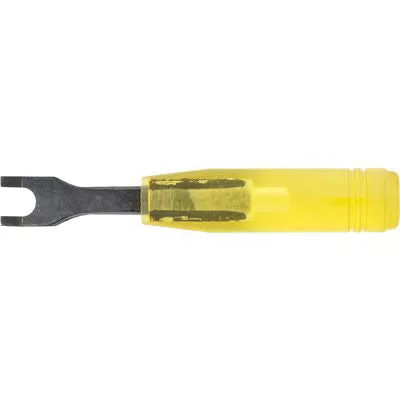
- Use the EIS removal tool to unscrew the retaining ring from the ignition cylinder.
- Reach behind the dash and pull the EIS module down to access the wiring.
- Disconnect Factory Plugs: Unplug the black 5-pin plug and the white 8-pin plug from the back of the EIS.
Phase 2: T-Harness & Hood Pin Installation
- Connect T-Harness:
- Plug the female 5-pin and 8-pin connectors from the T-harness into the back of the EIS.
- Connect the male 5-pin and 8-pin plugs from the T-harness into the OEM plugs you removed in Phase 1.
- Install Hood Pin (Safety):
- Mount the pin switch bracket to the driver-side fender mount using the factory T30 screw.
- Route the hood pin wire through the firewall grommet and connect it to the gray wire on the 6-pin EXP pigtail.
- Note: This prevents remote starting while the hood is open.
Phase 3: Synchronization & Testing
- Key Sync: Insert the key and start the vehicle manually. Let it run for at least 30 seconds to sync the module.
- Test Remote Start:
- Ensure the valet switch is ON (white dot pressed in) and the hood is closed.
- On the OEM key fob, press LOCK-UNLOCK-LOCK.
- Once started, test “Key Takeover” by inserting the key and turning it to position 2; the parking lights will flash 3 times.
- Test Safety Features:
- Open the hood and attempt a remote start; the lights should flash 7 times (Error: Hood Open).
- Turn the valet switch OFF; the lights should flash 4 times (Error: Valet Mode).
Phase 4: Optional Add-Ons & Customization
- Smart Phone Control: Connect Compustar Drone to the Gray 4-pin port or Directed Smart Start to the White 4-pin D2D port.
- Alarm Upgrades:
- Connect the included LED to the “LED” port.
- Connect an external siren to the brown wire (+) and black wire (-) of the 6-pin EXP pigtail.
- High Idle (RV Models): For the SKSNG906RV, use the provided OBD programmer to activate the High Idle software features.
Troubleshooting Flash Codes
- 4 Flashes: Valet mode is active (Switch is OFF).
- 5 Flashes: Not synced. Start manually and run for 30 seconds.
- 7 Flashes: Hood is open or hood pin is improperly grounded.
- 10 Flashes: Communication error; check T-harness seating.
Final Steps
- Sticker Placement: Apply the orange warning sticker to the OBD access panel to alert service technicians.
- Secure & Reassemble: Mount the module away from the steering column and pedals, then reinstall the EIS ring and dash panels.
- Connect the included LED to the “LED” port.
- Connect an external siren to the brown wire (+) and black wire (-) of the 6-pin EXP pigtail.
- 4 Flashes: Valet mode is active (Switch is OFF).
- 5 Flashes: Not synced. Start manually and run for 30 seconds.
- 7 Flashes: Hood is open or hood pin is improperly grounded.
- 10 Flashes: Communication error; check T-harness seating.